
Texture maps and examples
Visual reference for the diffuse, normal, specular, symbolic face, and coin maps bundled with Dice View.
This article documents the published v2. For the current physics preview, see the v3 guide. V3 ↗ Licenses ↗
This reference describes the actual v2 files shipped in dist/assets/dice-box/themes/ of @erpg/dice3dview 2.6.1. The interactive gallery and theme studio use v3 assets and renderer. Their compatible atlases help compare the structure, but the preview does not reproduce the v2 renderer.
Map summary
| Part | theme.config.json field |
Bundled example | Effect |
|---|---|---|---|
| Glyphs for dark bodies | material.diffuseTexture.light |
default/diffuse-light.webp |
Light numerals in the UV atlas |
| Glyphs for light bodies | material.diffuseTexture.dark |
default/diffuse-dark.webp |
Dark numerals in the same UV atlas |
| Relief | material.bumpTexture |
default/normal.webp |
Lighting detail without changing the mesh |
| Highlights | material.specularTexture |
default/specular.jpg |
Reflective regions; optional sample |
| Coin front | coin.front.texture |
default/coin-1.svg |
Artwork for value 1 |
| Coin back | coin.back.texture |
default/coin-2.svg |
Artwork for value 2 |
| Symbols | material.diffuseTexture.light/dark |
fate/faces-*.svg |
Replace numerals with system artwork |
diffuse-light.webp, diffuse-dark.webp, and normal.webp appear in the default manifest. specular.jpg ships with the assets but is not referenced by the default manifest: opt in with specularTexture.
Light and dark diffuse atlases
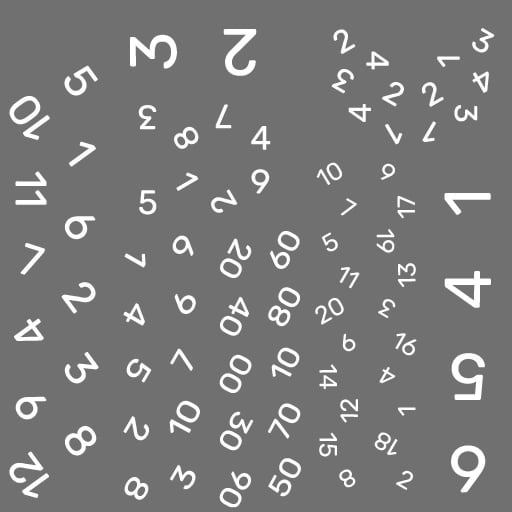
The diffuse atlas places d4, d6, d8, d10, d12, d20, and d100 faces on fixed UV islands. In a color material, transparent pixels reveal themeColor; opaque artwork preserves the numerals or symbols. The light/dark pair provides contrast: the renderer chooses a variant based on themeColor brightness.

When authoring, keep both variants at the same dimensions with identical UV island positions. Do not rearrange numerals into a conventional grid: locations correspond to the bundled mesh, and their visual order in the file does not match result order. For a typography change, work over a copy of the original atlas, preserving each face island. Use WebP or PNG with alpha; opaque backgrounds cover the body color.
"material": {
  "type": "color",
  "diffuseTexture": {
    "light": "diffuse-light.webp",
    "dark": "diffuse-dark.webp"
  },
  "diffuseLevel": 1
}
diffuseTexture also accepts one string when the art contrasts across your palette. A standard material uses the texture’s own color as the main surface color; this suits full-color art, but themeColor no longer replaces the diffuse color.
Normal map
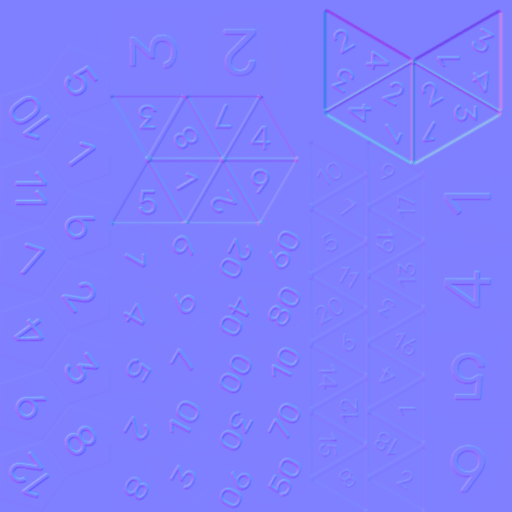
bumpTexture changes how light responds to the surface and creates an engraved or raised appearance. It does not add polygons, change colliders, or select the landing face. The bundled numeric map uses the same UV layout as the diffuse atlas. If you move a numeral in the diffuse atlas, update its relief too. bumpLevel controls intensity; 0 removes the visual effect.
"bumpTexture": "normal.webp",
"bumpLevel": 0.5
The bundled symbolic themes omit the numeric normal map so a raised numeral does not show beneath a new symbol.
Specular map
specularTexture controls where highlights appear. The bundled default/specular.jpg demonstrates the format and can be copied into your own theme. Merely placing it in the folder does not enable it: declare it in the manifest.
"specularTexture": "specular.jpg"specularPower exists in the public type but is not applied by renderer 2.6.1. Adjust the map and evaluate the lighting in a real v2 integration; the interactive studio uses the v3 renderer.
Coin front and back
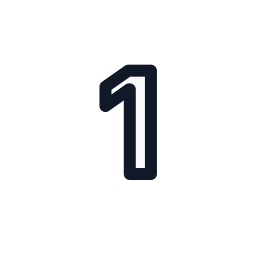
The d2 coin uses procedural geometry and two independent textures. The physical +Y front means 1; the back means 2. Keep front.value: 1 and back.value: 2 even when changing the artwork.
"coin": {
  "front": { "value": 1, "texture": "coin-1.svg" },
  "back": { "value": 2, "texture": "coin-2.svg" },
  "colorize": true,
  "diameter": 1,
  "thickness": 0.12
}
With colorize: true, transparency lets themeColor fill the body and rim. For a fully illustrated coin, set colorize: false and specify edgeColor.
Symbolic atlases
The fate, assimilation, vampire-v5-normal, and vampire-v5-hunger themes include faces-light.svg and faces-dark.svg. They reuse the default geometry and put glyphs on numeric UV islands. Fate, for instance, maps physical faces 1–2 to −1, 3–4 to 0, and 5–6 to +1. Core resolves the rule; View draws the symbol.

The manifest may include faceAtlas and faceMetadata to describe the mapping. These fields do not recalculate results or physics. Follow Customize symbolic faces for the full procedure.
Paths and delivery
Relative textures resolve from the theme folder. Root-relative / paths, HTTP(S) URLs, and data: URLs also work. For example, "../default/normal.webp" in themes/my-theme/theme.config.json reuses the bundled map. For external distribution, host the folder, configure externalThemes, and allow the app origin through CORS. Check asset HTTP responses before testing 3D.
Follow Create a 3D theme to build, test, and host your own theme.